
Introducing Dispatched: an Azure Service Bus explorer for Windows, macOS and Linux
A free, open-source desktop app, CLI and MCP server for inspecting Azure Service Bus messages, troubleshooting dead-letter queues and replaying messages across platforms.
Publisher
October 25, 2026
4 min read
When a message ends up in a dead-letter queue, you need to see why it failed, inspect its contents and decide what to do next. That workflow should be available on whichever operating system your team uses.
We built Dispatched to bring Azure Service Bus exploration and message operations to Windows, macOS and Linux. It is free and open source, with a native desktop app, a command-line interface and an MCP server for AI assistants. The first public preview, version 0.1.0, is available now.
A cross-platform ServiceBusExplorer alternative
ServiceBusExplorer is an established tool in the Azure ecosystem. Dispatched offers another option for teams that want to work with Azure Service Bus across operating systems, or bring the same operations into scripts and agent workflows.
The focus is Azure Service Bus: queues, topics, subscriptions and the messages moving through them. Dispatched can import and export ServiceBusExplorer entity XML and read its BrokeredMessageTemplate files. It does not replace ServiceBusExplorer’s Event Hubs, Notification Hubs or Relay tooling.
Inspect first, then act
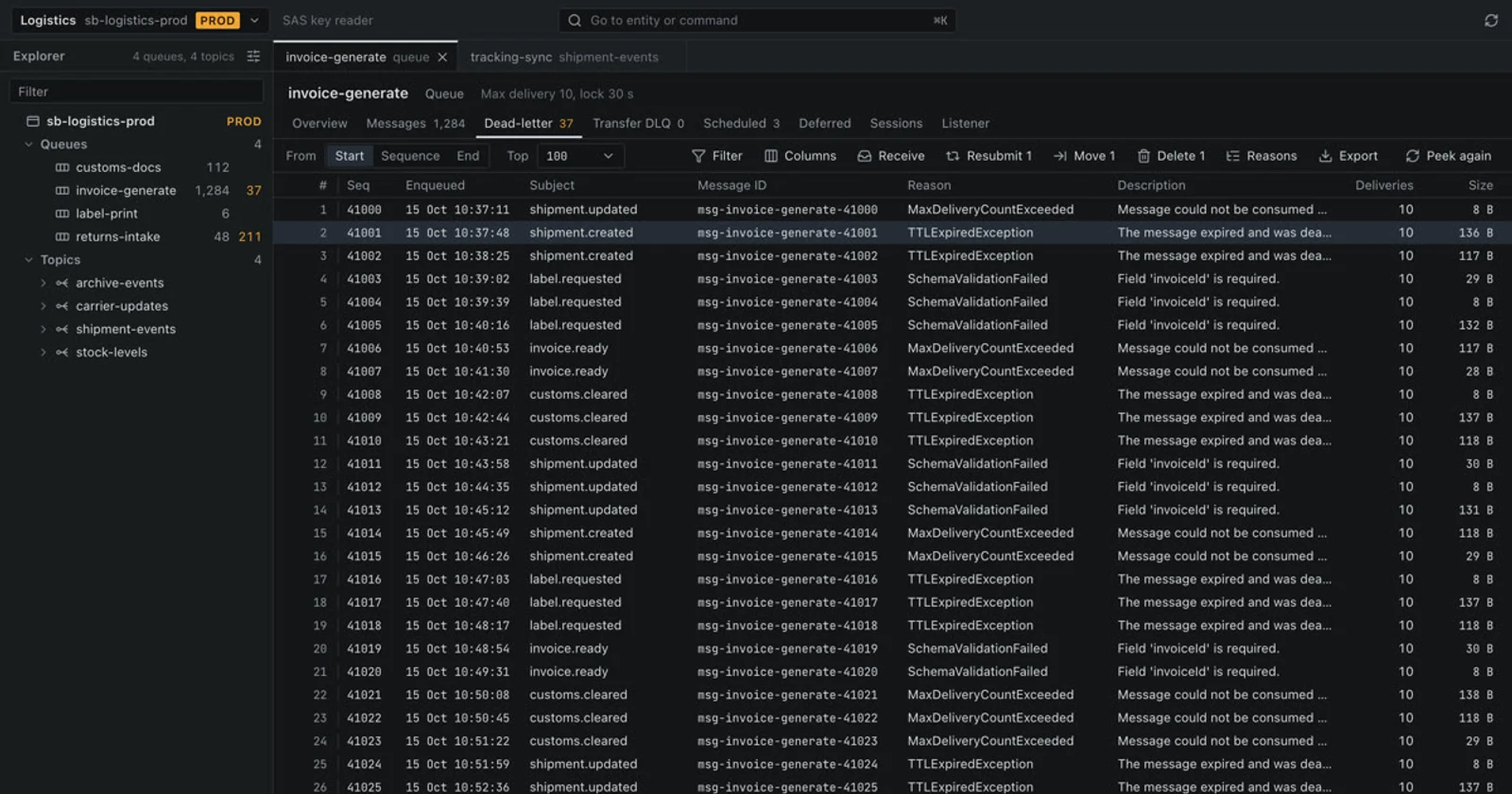
The desktop app brings namespace navigation, message counts and message inspection into one workspace. You can peek at active, scheduled, deferred, dead-letter and transfer dead-letter messages without locking or consuming them. Bodies can be viewed as JSON, XML, text or hex.
Property filters, body text search, regular expressions and JSONPath help narrow down a queue. A dead-letter summary groups failures by reason and description, so you can start with the pattern rather than opening every message individually.
For example, after correcting a consumer that rejected a particular payload, you can inspect the affected dead letters, export a copy, and resubmit selected messages with edits. Dispatched also supports sending and scheduling messages, receiving and settling them, moving messages, managing sessions and cancelling scheduled messages.
Make the effect of a change visible
Message tools need to make consequential actions clear. Dispatched shows the intended effect before a change runs. On profiles marked as production, confirmation requires the name of each entity being changed. Changes are recorded in a local activity log shared by the desktop app, CLI and MCP server.
These controls help you review an operation; they do not make destructive actions reversible. Export messages before deleting or purging them when you need to keep a copy.
The same workflow from a terminal
The CLI supports browsing, message operations and entity management, with JSON output for scripts. Once you have downloaded and extracted the CLI archive, you can sign in and inspect a dead-letter queue:
dispatched login
dispatched namespaces
dispatched --namespace myns ls --topics
dispatched --namespace myns peek orders --dlq
Connect using Microsoft Entra ID or a connection string, save profiles for different environments, and work locally with the Azure Service Bus Emulator. Credentials are stored in the system keychain. The repository documentation covers connection profiles, filtering and operations.
An MCP interface for AI assistants
Dispatched also exposes a Model Context Protocol server. A connected assistant can inspect entities, search messages and summarize dead-letter queues. Write operations require confirmation through a compatible MCP client; clients that cannot display confirmation forms cannot make changes. A read-only mode omits the write tools entirely.
For teams exploring agent-assisted troubleshooting, this provides a way to connect an assistant to the same messaging tools and activity log used by a person. See the MCP setup guide for configuration and confirmation behavior.
Try the public preview
Dispatched 0.1.0 is a preview and is not ready for production use. Settings and storage formats may change before 1.0. Start with a development namespace or the emulator, and check the release notes for platform requirements and known limitations.
Visit dispatchedapp.com for the product overview, get desktop installers and CLI archives from GitHub Releases, or explore the Apache-2.0 source code. If you find a problem, open an issue without including connection strings, credentials or private message contents.